Sudobian Server · Debian 13 · amd64 · sin escritorioSudobian Server · Debian 13 · amd64 · headless

Hecho por sysadmins,
para sysadmins.
Built by sysadmins,
for sysadmins.

La edición servidor de sudobian: Debian 13 sin escritorio, endurecido desde el primer arranque y con las herramientas de administración ya instaladas. Sobre esa base, 26 roles opcionales que se eligen en la instalación: contenedores, web, bases de datos, monitoreo, backups, VPN, almacenamiento, nube y automatización, auditoría y virtualización. The server edition of sudobian: Debian 13, headless, hardened from first boot, with the administration tools already installed. On that base, 26 optional roles chosen at install time: containers, web, databases, monitoring, backups, VPN, storage, cloud and automation, auditing and virtualization.

Debian 13 trixie · amd64 · BIOS + UEFI · headless
sudobian-server - sysinfo
root@sudobian-server:~# sysinfo
OS Sudobian Server 1.0 (Tandil) - Debian GNU/Linux 13
SSH :5022 root login off · maxauth 3
ufw active - incoming denied, 5022/tcp allow
Ports 5022 (ssh) 9090 (cockpit → LAN only)
Net eno1 DHCP up Roles 26/26 ok
root@sudobian-server:~#
Diferencias con DebianDifferences from Debian

Qué agrega sobre DebianWhat it adds over Debian

Cosas que un Debian recién instalado no trae configuradas.Things a fresh Debian install doesn't set up.

01

Firewall activo desde el inicioFirewall active from the start

Debian se instala sin firewall. Aquí ufw bloquea todo lo entrante desde el primer arranque, y el sistema verifica que quedó así.Debian installs with no firewall. Here ufw blocks all incoming from first boot, and the system verifies it did.

02

Docker no saltea el firewallDocker can't bypass the firewall

Con Debian + Docker, publicar un puerto con -p lo abre al exterior aunque ufw tenga la entrada cerrada: Docker escribe sus propias reglas de iptables y no pasa por ufw. Aquí una regla en DOCKER-USER hace que esos puertos solo se alcancen desde redes privadas.With Debian + Docker, publishing a port with -p opens it to the outside even with ufw's incoming closed: Docker writes its own iptables rules and doesn't go through ufw. Here a DOCKER-USER rule makes those ports reachable only from private networks.

03

Bases y paneles cerradosDatabases & panels closed

MariaDB y PostgreSQL escuchan solo en localhost; phpMyAdmin y Cockpit, solo desde redes privadas, desde que se instala el rol. En un Debian normal, cada una de esas restricciones hay que configurarla a mano.MariaDB and PostgreSQL listen only on localhost; phpMyAdmin and Cockpit, only from private networks, from the moment the role is installed. On a plain Debian, each of those restrictions has to be set up by hand.

04

Historial de cambios de /etc, sin filtrar contraseñasChange history for /etc, without leaking passwords

Cada cambio en la configuración de /etc queda registrado con git, así se puede ver qué cambió y volver atrás. El problema es que, instalado tal cual, ese historial guardaría también las contraseñas del sistema y las claves privadas. Aquí se configura para dejarlas afuera y el historial arranca limpio.Every change to the config in /etc is recorded with git, so you can see what changed and roll it back. The catch is that, installed as-is, that history would also store the system passwords and private keys. Here it's set up to leave those out and the history starts clean.

05

SSH más estrictoStricter SSH

Puerto 5022, root sin acceso, 3 intentos, fail2ban sobre el puerto real y un camino guiado a solo-clave sin quedar fuera. Debian trae el 22 y 6 intentos.Port 5022, no root login, 3 tries, fail2ban on the real port, and a guided path to key-only without locking yourself out. Debian ships 22 and 6 tries.

06

Roles desde un menúRoles from a menu

26 opciones, con repos de terceros ya configurados (Docker, Kubernetes, Helm, OpenTofu), sin agregar claves ni sources a mano. Más particionado LVM pensado para servidor.26 options, with third-party repos preconfigured (Docker, Kubernetes, Helm, OpenTofu), no adding keys or sources by hand. Plus LVM partitioning built for a server.

Roles opcionalesOptional roles

26 roles, se eligen en la instalación26 roles, chosen at install time

Nada viene marcado. Se eligen por categoría durante la instalación y se instalan en el primer arranque; o se agregan después con sudobian-setup. Nothing is pre-checked. Chosen by category during install and installed on first boot; or added later with sudobian-setup.

ContenedoresContainers
dockerDocker CE + compose + buildx k8s-clientkubectl + helm
Web
webApache mpm_event + PHP-FPM + certbot phpmyadminredes privadasprivate networks
Bases de datosDatabases
mariadblocalhost postgresqllocalhost redisRedis
MonitoreoMonitoring
monitor-prometheusnode-exporter monitor-zabbixzabbix-agent2
Backups
borgbackup restic rclone rsnapshot
VPN
wireguardWireGuard openvpnOpenVPN + easy-rsa
AlmacenamientoStorage
raidmdadm sambaSMB/CIFS nfsNFS disk-toolsbtrfs, testdisk, ddrescue
Nube y automatizaciónCloud & automation
ansible awscli opentofuOpenTofu
AuditoríaAuditing
security-scanlynis, rkhunter, aide… network-scannmap, sslscan, tshark…
OtrosOther
virtKVM + libvirt + virtinst panelCockpit · redes privadasprivate networks
Seguridad por defectoSecure by default

Endurecido de fábricaHardened out of the box

Verificado en una instalación real en hardware físico.Verified on a real installation on physical hardware.

SSHPuerto 5022, root sin acceso, máx. 3 intentos por conexión. Paso guiado a solo-clave que primero comprueba que hay una clave instalada.Port 5022, no root login, max 3 tries per connection. Guided key-only step that first checks you have a working key installed.
ufwActivo desde el primer arranque: entrada bloqueada salvo SSH, salida abierta. El sistema verifica que quedó activo y con la regla.Active from first boot: incoming blocked except SSH, outgoing open. The system verifies it stayed active with the rule.
DockerUna cadena en DOCKER-USER deja pasar los puertos de contenedores solo desde redes privadas. Para abrir uno a internet, a propósito: sudobian-docker-expose.A DOCKER-USER chain lets container ports through only from private networks. To open one to the internet, on purpose: sudobian-docker-expose.
fail2banJail de SSH activa sobre el puerto real (5022), no el 22 por defecto de Debian.SSH jail active on the real port (5022), not Debian's default 22.
etckeeper/etc versionado con git desde la instalación. Nunca guarda shadow, gshadow, claves privadas ni credenciales; se verifica en el commit inicial./etc versioned with git from install. Never stores shadow, gshadow, private keys or credentials; verified in the initial commit.
upgradesunattended-upgrades solo de seguridad, a diario, sin reiniciar solo, con mail cuando cambia algo.unattended-upgrades security-only, daily, no auto-reboot, with mail when something changes.
ApacheOculta su versión (ServerTokens Prod, ServerSignature Off), sin listado de directorios y sin mod_php.Hides its version (ServerTokens Prod, ServerSignature Off), no directory listing, no mod_php.
AppArmorActivo con perfiles en modo enforce. auditd, needrestart y molly-guard también activos.Active with profiles in enforce mode. auditd, needrestart and molly-guard active too.
CapturasScreenshots

Un vistazo a la distroA look at the distro

Del arranque a la máquina lista y verificada.From boot to a ready, verified machine.
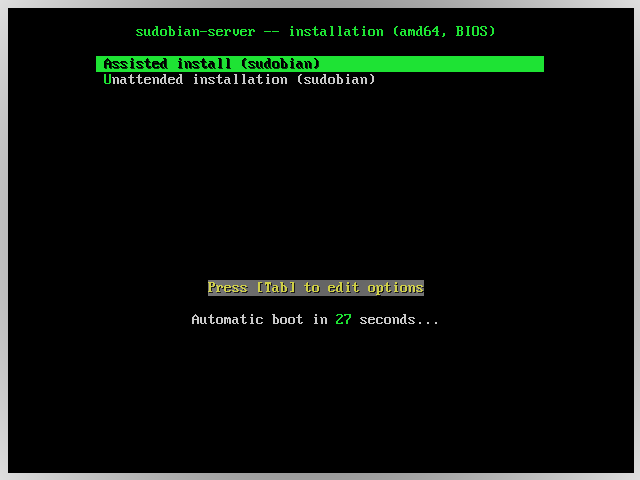
Menú de arranque: instalación asistida o desatendida
Arranque: instalación asistida o desatendidaBoot: assisted or unattended install
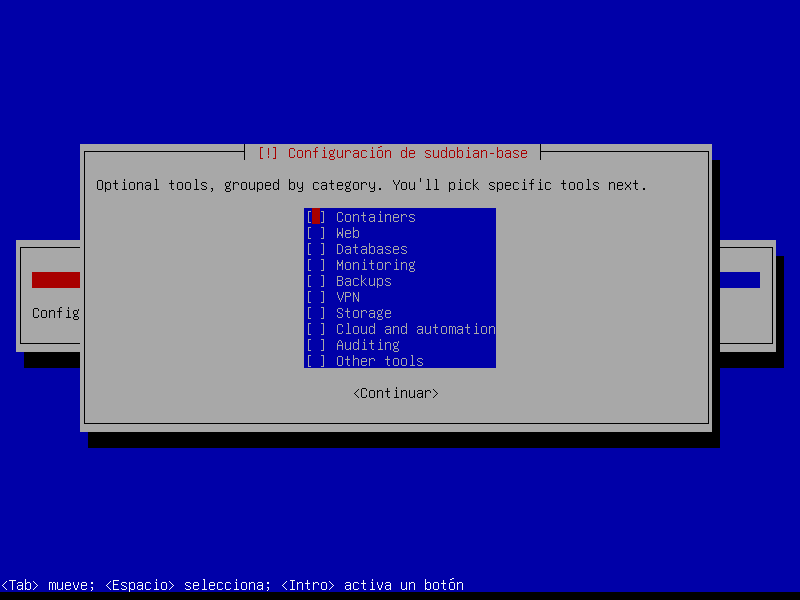
Selección de categorías de roles en el instalador
Elección de categorías de rolesChoosing role categories
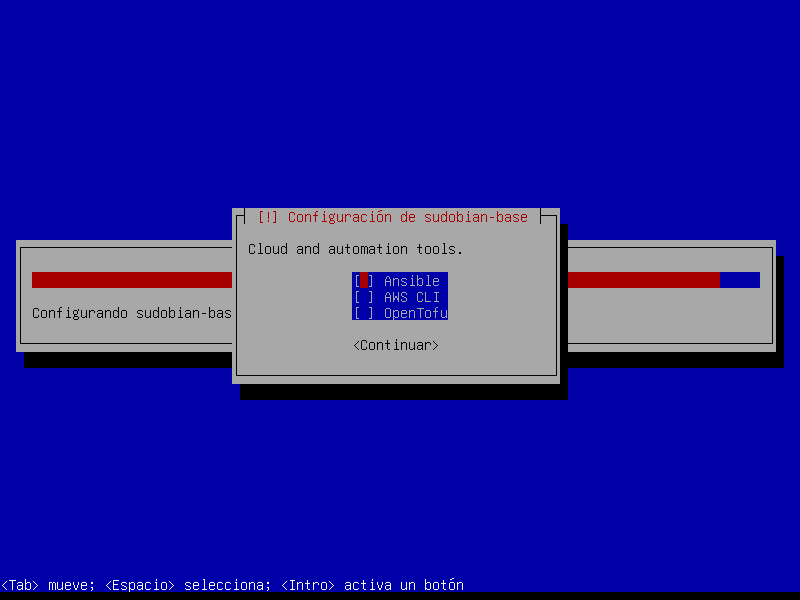
Selección de herramientas dentro de una categoría
Selección de herramientas dentro de una categoríaPicking tools within a category
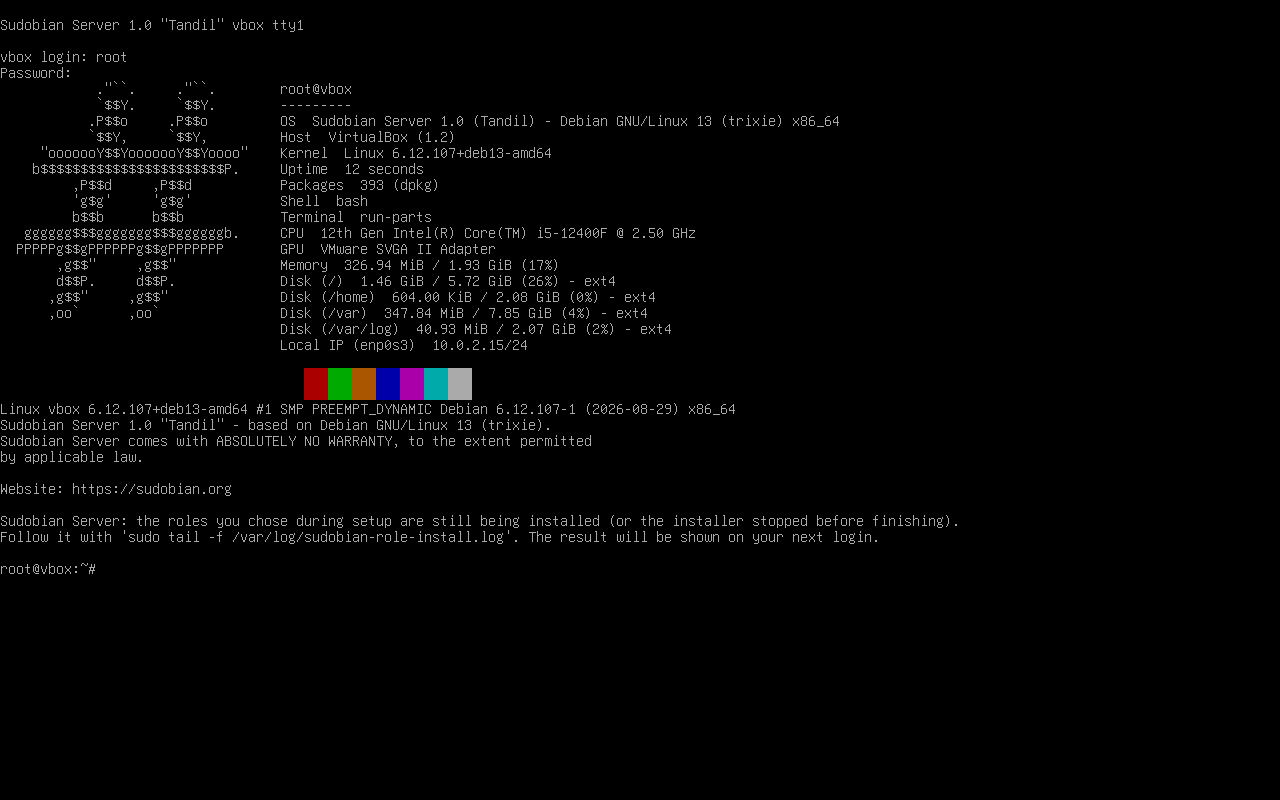
Primer arranque con el estado de instalación de los roles
Primer arranque, con el estado de los rolesFirst boot, with the role install status
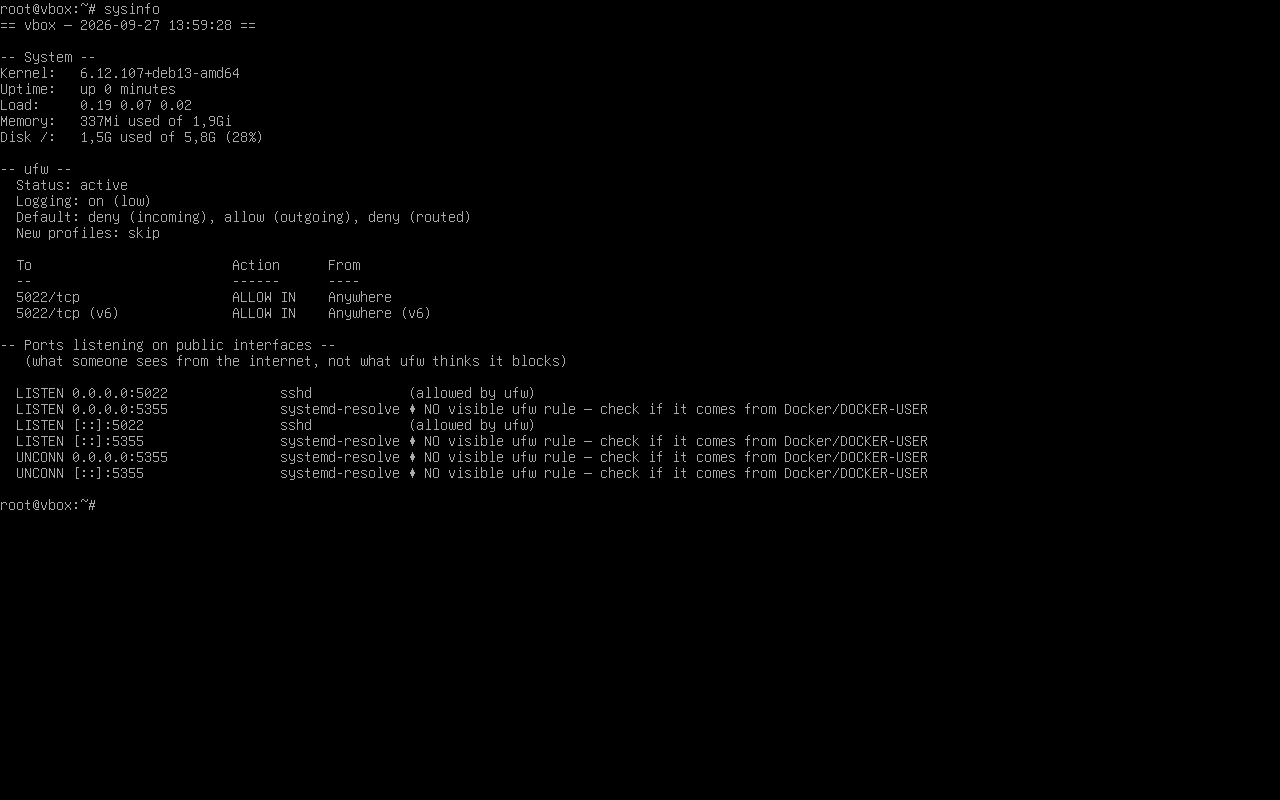
Salida de sysinfo: ufw y puertos que escuchan
sysinfo: ufw y lo que escucha de verdadsysinfo: ufw and what's really listening
Cómo funcionaHow it works

Decisiones de diseñoDesign decisions

Red declarativa, sin scripts en el arranqueDeclarative network, no boot scripts

Una configuración fija de systemd-networkd toma cualquier placa en*/eth* por DHCP, con DNS de systemd-resolved. La configuración es fija; la IP es por DHCP. Para IP fija se edita el .network.A fixed systemd-networkd config brings up any en*/eth* NIC via DHCP, with systemd-resolved DNS. The config is fixed; the IP is DHCP. For a static IP you edit the .network.

Roles: al arranque y despuésRoles: at boot and later

Se eligen durante la instalación y se instalan al primer arranque con un servicio que corre una sola vez; el resultado queda registrado por rol y el primer login avisa si alguno falló. Más adelante se agregan otros con sudobian-setup, que los toma de un repo local en /var/lib/sudobian/local-repo, sin reinstalar la máquina.Chosen during install and installed on first boot by a service that runs once; the result is logged per role and the first login flags any that failed. More can be added later with sudobian-setup, which pulls them from a local repo at /var/lib/sudobian/local-repo, without reinstalling.

sysinfo: lo que de verdad escuchasysinfo: what's really listening

Marca cada puerto que escucha fuera de localhost sin una regla visible en ufw. Sirve justo para detectar lo que Docker abre por fuera del firewall.Flags every port listening beyond localhost with no visible ufw rule. Exactly what catches what Docker opens outside the firewall.

Dos modos de instalaciónTwo install modes

El instalador asistido pregunta disco, usuario y roles paso a paso. El desatendido usa un preseed y no pregunta nada: instala solo, ideal para aprovisionar en serie, aunque borra el disco elegido sin confirmar.The assisted installer asks for disk, user and roles step by step. The unattended one uses a preseed and asks nothing: it installs on its own, ideal for provisioning at scale, though it wipes the chosen disk without confirming.

LímitesLimitations

  • Solo amd64 está validado (arm64 queda para más adelante).Only amd64 is validated (arm64 is for later).
  • Los roles necesitan internet en el primer arranque.Roles need internet on first boot.
  • El rol web no abre el 80/443 en ufw; se abre manualmente.The web role doesn't open 80/443 in ufw; you open it manually.
  • El repositorio local de paquetes no está firmado.The local package repo is unsigned.
  • La instalación desatendida borra el disco completo sin confirmación; sin clave SSH, la primera entrada es por consola.The unattended install wipes the whole disk without confirmation; with no SSH key, the first login is on the console.
Changelog

ChangelogChangelog

La edición actual de la imagen y lo que está en camino para la siguiente.The current image release and what's on the way for the next one.

v1.0 actualcurrent Debian 13 trixie · amd64
  • Endurecido desde el primer arranque: ufw con la entrada cerrada, SSH en 5022 sin root, fail2ban.Hardened from first boot: ufw with incoming closed, SSH on 5022 with no root, fail2ban.
  • Docker que no saltea el firewall (puertos de contenedores solo desde redes privadas).Docker that can't bypass the firewall (container ports only from private networks).
  • 26 roles opcionales en 10 categorías, elegidos en la instalación.26 optional roles across 10 categories, chosen at install time.
  • Núcleo de administración endurecido (~70 herramientas), con etckeeper sin secretos.Hardened admin core (~70 tools), with etckeeper keeping no secrets.
  • Dos modos de instalación: asistido y desatendido (preseed).Two install modes: assisted and unattended (preseed).
  • Actualizaciones de seguridad automáticas y AppArmor en modo enforce.Automatic security updates and AppArmor in enforce mode.
PróximoNext planeadoplanned
  • Soporte arm64.arm64 support.
  • Firmar el repositorio local de paquetes.Sign the local package repository.
  • IP estática desde el instalador (hoy se edita a mano).Static IP from the installer (edited by hand today).
  • Más roles y perfiles predefinidos.More roles and predefined profiles.
ContactoContact

EscríbenosGet in touch

Para consultas sobre la edición server o para reportar un problema.For questions about the server edition or to report a problem.

DescargaDownload

Imagen ISOISO image

Se puede probar primero en una máquina virtual, o grabar a un USB con dd, balenaEtcher, Rufus (modo DD) o Ventoy. Conviene verificar el checksum SHA256 que aparece debajo.Can be tried first in a virtual machine, or written to a USB drive with dd, balenaEtcher, Rufus (DD mode) or Ventoy. Verify the SHA256 checksum shown below.

Server
sudobian-server-1.0-tandil-amd64.iso
Debian 13 · amd64 · installer · ≈700 MB
⬇ Descargar ISODownload ISO
SHA256 ecacc56b75ef93500c36477bd47f34f4c533956e489cf5f0de5234868b8c7f5e